I have such a headache, but it's finally finished! I have now completed her story and she gets the ending she deserves!
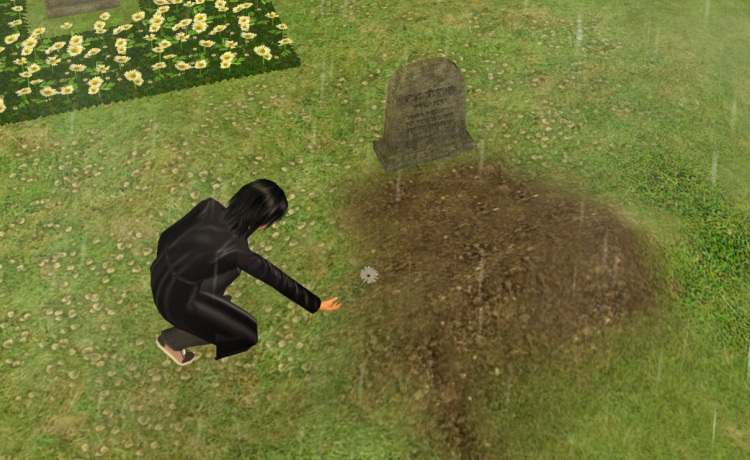

I have such a headache, but it's finally finished! I have now completed her story and she gets the ending she deserves!
It's done! It's finally done! After many, many weeks, I have finally written Jasmine's last chapter! Twenty years later, Jasmine finally gets an ending to her story!
It's only a first draft, so it'll need a lot of polishing. And there's still a load of missing screenshots for the previous chapters to do, as well as the final chapter's, plus the epilogue. But the end is in sight!
Not spoilery picture for you!
 Continue reading
 Following on from the last post, since I've got TS2 (mostly) working, I thought I may as well make the most of this short burst of energy while I have it. My intention is to finish Jasmine's story by the end of the year. It's literally the last chapter! I can do this!
So Sims 2 works, but whenever I open the Deco > Misc menu and scroll to page 2, the game crashes and closes, so I'm doing the whole clear out downloads and binary sort method. The only problem with that is the actual game takes ages to load. I don't mean the way it takes ages ON the loading screen to load up all the CC. I mean I'll double click, it's there in Task Manager, but it's five minutes before anything comes up on screen. Okay, even with the downloads folder removed, it's still crashing when I open that menu, but it works fine on my old Win7 netbook. But from browsing via Room > Decor I think it might be an outdoor object? Maybe I should restore the disc version of the exe and see if it's just a no-cd crack issue. Guess I'm just screwed, it's not easy to keep the removable DVD drive attached to the tower.
Continue readingI started the install process back in December 2023. I kept hitting a wall when trying to install Uni, but there is a fix for it. You need to do a manual update (directions here). Once you've sorted that, you're good to go.
I got all my EPs installed (UNI, NL, OFB, SNS). I copied my old no-cd crack from my netbook (I'm still paranoid about Securom haha. Also I don't have an onboard optical drive on here either). But then my screen went like this.
Continue reading
I know, I can't believe either that it's taken me 10 years to know this is a thing, but, wow, way to go, EAxis. No one sucks quite like you do (Thoma$$ sucks more, but in a different way). So actual in-game non-cheatery functions can cause your hoods to implode. I've done some VBTs to my main playing hood, namely deleting sims from the bin and moving sims in their lots from one neighbourhood to another. So realising it's only a matter of time (although it could be a long time, who knows) before my hood turns into a BFBVFS, I thought it better to just extract my sims with SimSurgery and create a brand new hood and place a list of things not to do as the neighbourhood description. Since it's been years since I played any of my old families, I can't remember their stats anyway, so I'm fine with starting them again.
The problem is, EAxis insist on planting those premades into your family bin, and control freak that I am, I just don't want any playables that I didn't make in my main hood. I followed the safe(r) method tutorial to delete them only now neither of the two new households I created are ageing. I thought the problem was the recent installation of a lifespan mod but after testing it seems the problem is more likely the batbox stage of deleting sims as before that the sim was ageing fine. So my new supposed to be unborked hood is now borked even more than my worked neighbourhood. Way to go EA. If you had just had the sense to create a non-BFBVFS delete function this wouldn't even be an issue. So now that hood has to be scrapped too.
Continue readingIn an exclusive teleconference with EA, T$R's Steve has been able to leak us the following previews of The Sims 4!
In his dreams 😀
The Agent Pixies were revealed first by, I believe, AllGamesBeta.com. Please click the link to see the rest.
UPDATE: Official site is live: http://thesims.com
One thing I have to say, they don't look so puddin-faced as TS3 Sims. That was reason #1 that TS3 was a DNW for me.
 Continue reading
 Have you deleted a custom eye colour, only to find that your sims are left with ugly Maxis brown eyes? Especially when you have splendiferious default replacements that you'd prefer your sims to have?
Here's a quick guide to fixing it.
You will need:
FIRST OF ALL: Backup your saved games. Go and do it now. Go on.

Done? Okay. Open SimPe and go to Tools > Neighbourhoods > Neighbourhood Browser, like so:
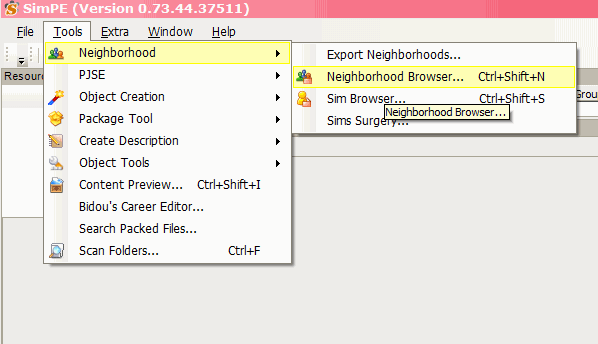
Select the neighbourhood of the offending sim, then let it do its thing. Then click Tools > Neighbourhood > Sim Browser
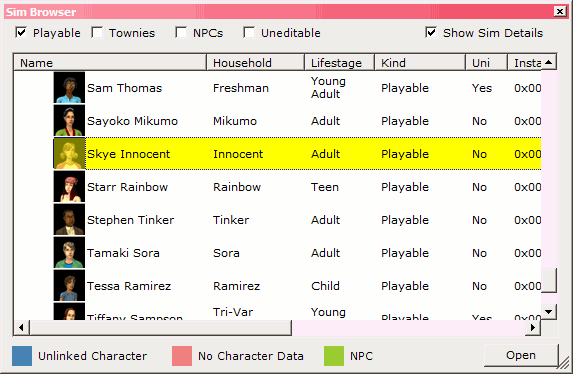
Click on Name to make it easier to search, then look for your sim. Double-click him/her.
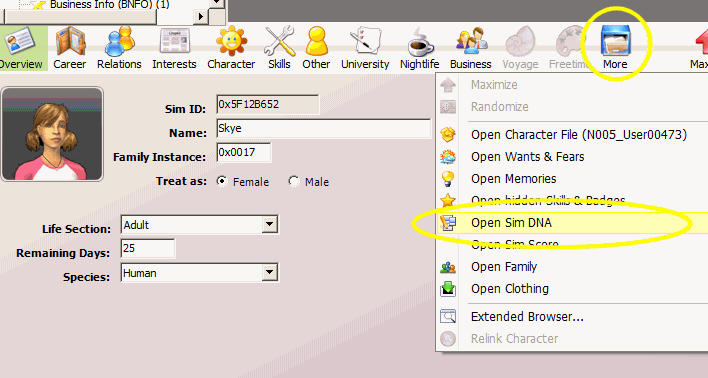
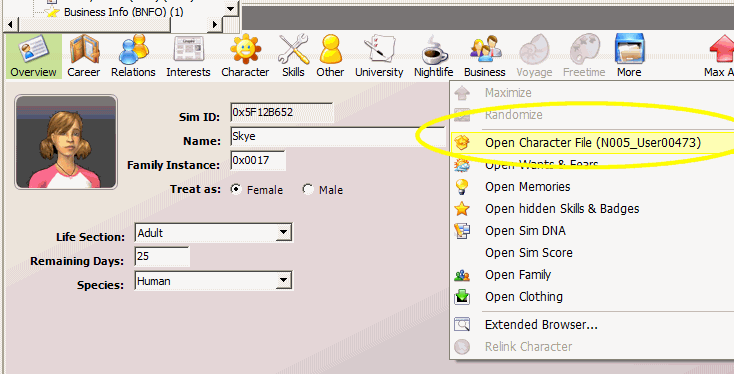
Click on More > Open Sim DNA
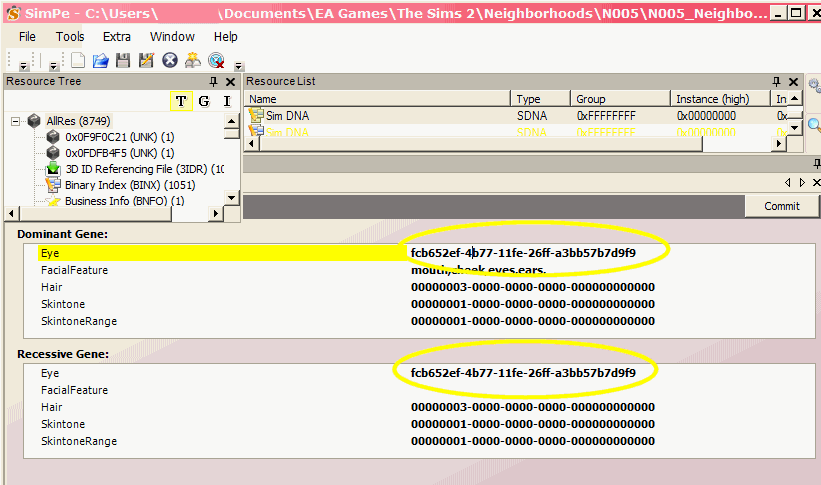
This part is simple enough. You need to replace the eye values with the Maxis GUIDs. Here they all are:
Just replace the string in the dialogue with the GUID of the colour you want. I'm going for Light blue here.
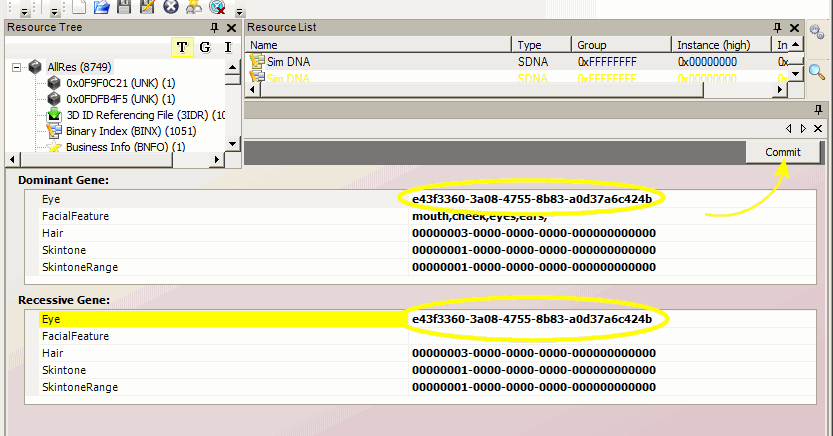
Once you've entered the new values, hit Commit and then save your file.
Close the Sim DNA panel by pressing the little X above the Commit button. Now you should be back on your sim's profile. Click More again, and this time select Open Character File:
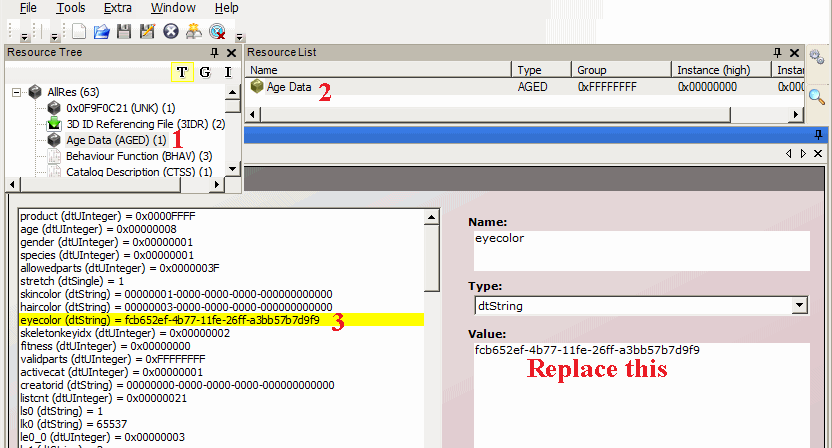
Click Age Data in the Resource Tree panel, then Age Data in the Resource List Panel. Click eyecolor (dString) and replace it with the Maxis GUID you used earlier. Then hit Commit and save the file.
Almost done!
Load up your game. Load up your Sim's lot.
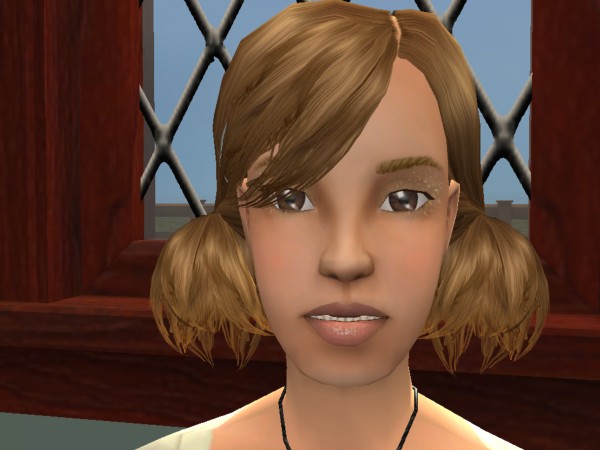
Eww, there are those ugly Maxis brown eyes.
Select the Sim and send them to a mirror. Select Change Appearance (you don't have to actually change anything), then press the confirm button. Now check out your Sim's new default (replacement) eyes!
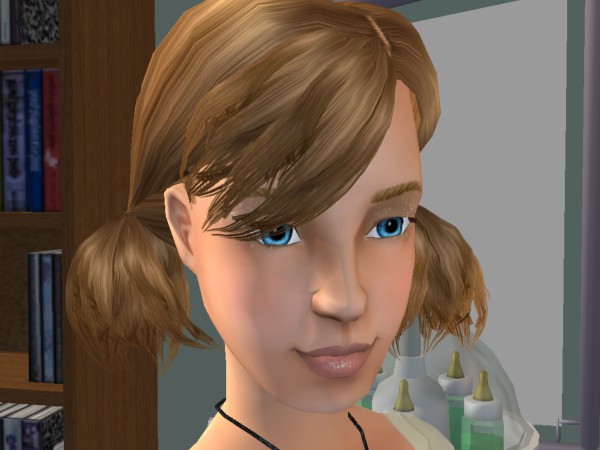
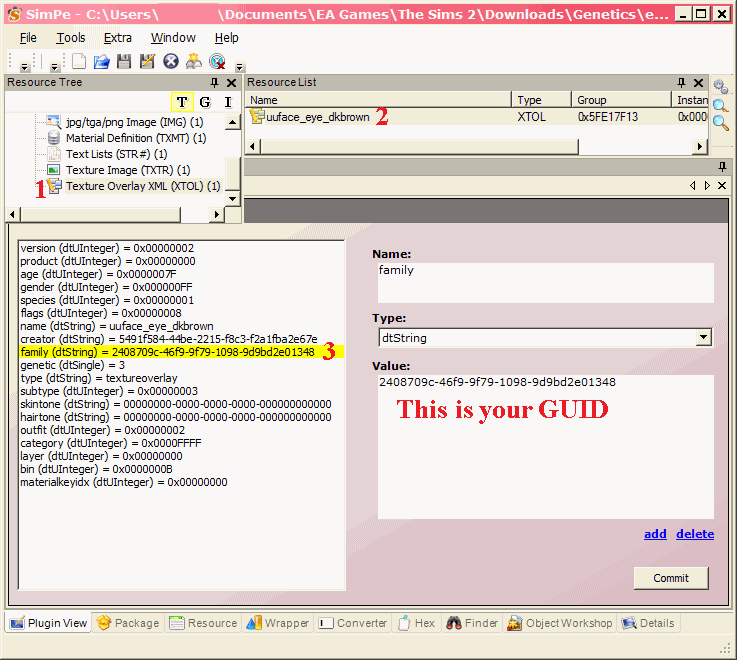
You can also change to a custom eye colour. Instead of the Maxis GUIDs above, just find the GUID of the custom eye you want. Open up the file in SimPe and do this:
Funny video:
W000o0o0ho0ho000o0o00000! You know Seasons is the one EP I really wanted. Uni I wanted for the Hang Out interaction for my stories, NL for the cars (although it also seemed the funnest out of the ones my poor XP box could handle) and OFB for no other reason than that I wanted the Magisplay tray for my screenies, which is kind of ironic, since I only bought it recently, long after I retired from Sim storytelling. But Seasons was the one I really wanted.
So despite my super-slow processor, the amazingly great graphics card (compared to the CCLOCIC) means I can actually play it! So I bought a copy second-hand (didn't I say no more of my money is going to be used to pay SHERRIE DANDAN'S wages?). I eagerly opened the box, then thought: Oh wait, this is EA we're talking about. Checked the back of the disc and ZOMGNOWAIZ! "Sony DADC"! Gaaaaah!
Continue readingUpdate: this page hasn't been updated in a long time, since I stopped bothering with paysite drama years ago. The links may become out of date any time. Click at your own risk. Also note I don't run any of these sites. If a link no longer works or has changed, try the Wayback Machine and comment below. Feel free to recommend other anti-paysite links.
Since I seem to be getting quite a lot of hits for this, here's where you can get paysite custom content for free (including peggy, rose, thesimsresource aka TSR, etc):
Continue readingWho'd have thunk it? My netbook, despite its slowness, does actually have a pretty good graphics card on board. ATI Radeon 6250 apparently. Whatever that means, it's utterly better than the CCLOCIC (crappy crap load of crap Intel chipset). I'm surprised by how smoothly TS2 is playing on here, even with the addition of another expansion pack.
Better still, anti-aliasing also seems to be enabled on here. Have a look (click for big):
Old PC vs new PC:
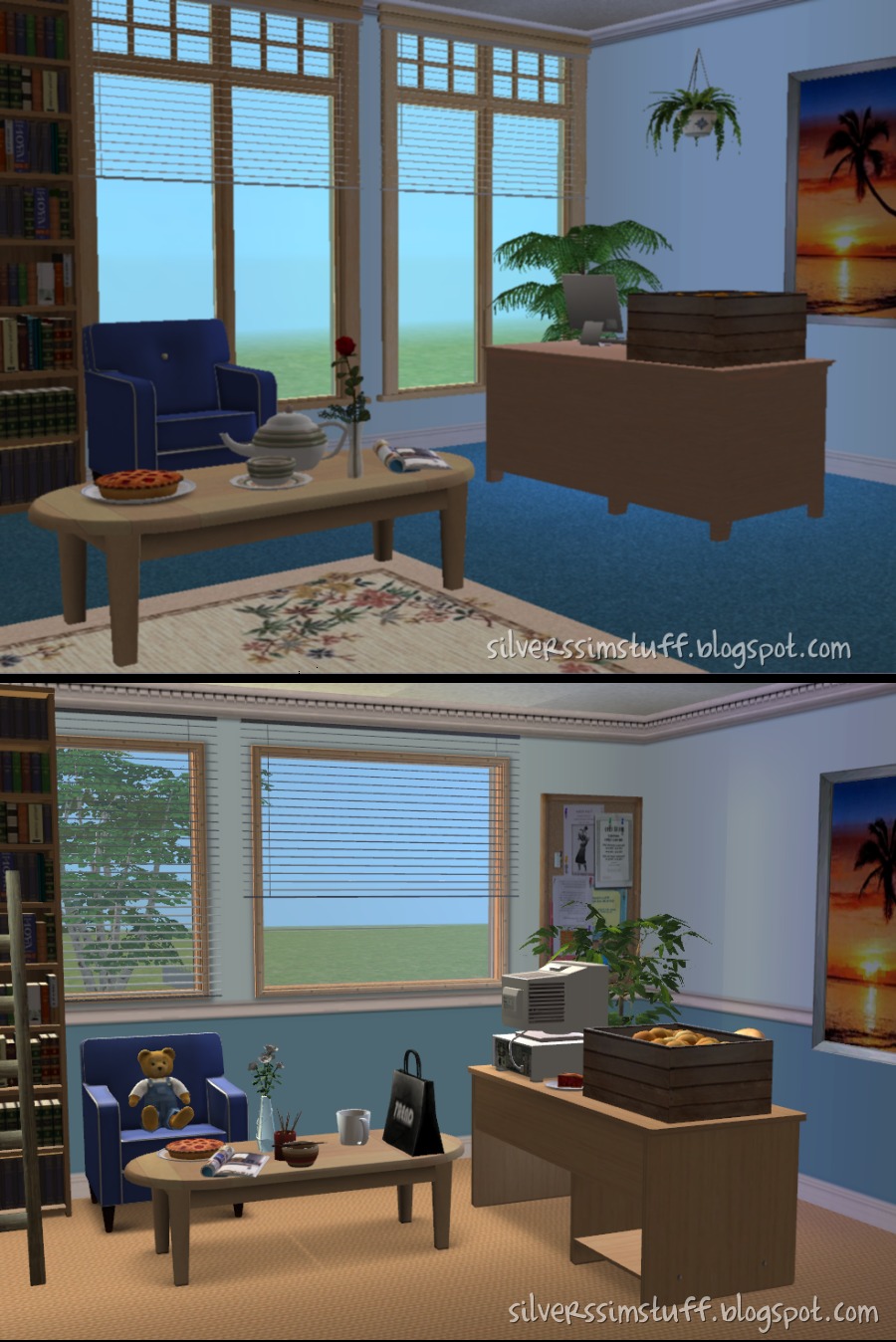
New PC:

Eh, anyway, it looks a LOT better, and plays a lot more smoothly (when I say "play", I haven't actually put any Sims into it yet. I'm only using it for props.)
YaY for the Radeon chipset!
A concerned mother recently posted on Coconut's shoutbox about her worries over her daughter's IM communication with Thoma$ at TSR. As these are chat boxes, start reading from the bottom message in each screenshot.


Click for big
Best laugh I've had since I read T$R's April Fools message -> thesimsresource.com/articles/myths
The depths Thoma$ will sink to... Buggybooz @ MTS2, who PS is one of my fave CC artists, recently had her stuff ripped off by Shakeshaft, one of T$R's Featured Arti$ts. Obviously, Buggy was very upset and kicked up a fuss.
Then Buggy's MTS2 account got hacked, and her stuff all pulled. Her policy was changed to 'do whatever you like with my content'. Coincidence? I think not. An IP check reveals a match with Thoma$$...
From MTS2's Delphy:
I think it's clear here one of the following things happened:
- Either Thomas himself removed Buggy's stuff, or
- Thomas gave the password to his account to somebody else at TSR and they removed itIn addition to the above, they must have gotten buggy's password from somewhere, which indicates one of two things:
Continue reading

How cosy!
You remember Neptune "Why Not Make All FA Content Subscriber-only" Suzy?
Here is an interesting bit of gossip from Calalily at PMBD:
She was canned by TSR as an FA, and to save face begged Thomass to be allowed to stay on as FA for free. Thomass being the cheap b*****d he is, agreed (all for Silus, all for Silus). So Neptune Suzy's downloads are pay, but she doesn't get a single cent for them - serves her bloody right.
