A little something from PMBD. Check it out!

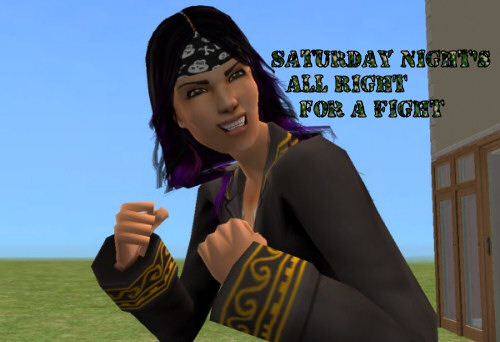
With our host, Ms Jasmine Elemita, Pirate Apprentice
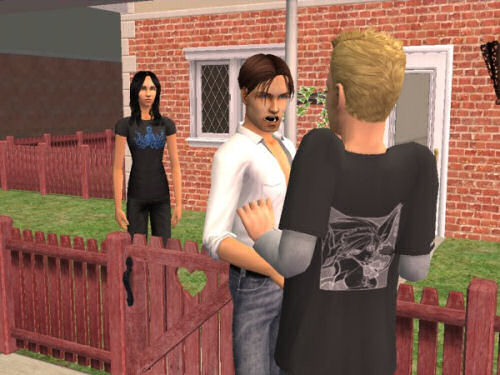
Uh oh, the ex and current boyfriend seem to be having a disagreement.
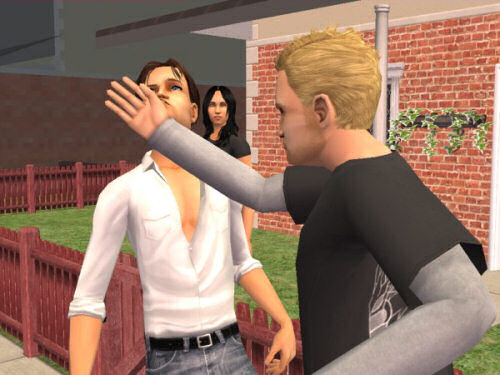
KAPOW! But Jasmine doesn't seem bothered at all.
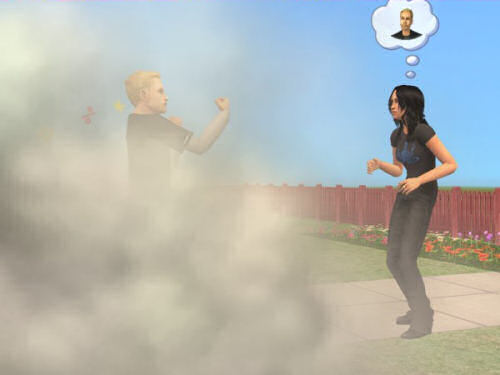
'Let's take this one out back, buddy.'
'Don't call me "buddy"!'
DOH!
No, my problem isn't really with Maxis, but that beyond-a-joke publisher, EA. The last TS2 expansion pack, Freetime, is released soon here in the UK, and EA have seen fit to bundle that SecuROM malware with that too, despite the thousands of complaints they've received on the matter. What a joke.
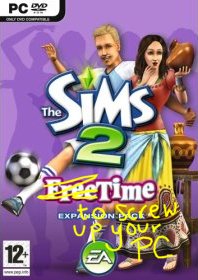
Why can't EA get it into their heads that they can stick all the Securoms they want onto their discs, it will do absolutely feck all to stop people pirating the game? EA, you fools, by bundling malware with your games all you are going to do is alienate your genuine customers, and push them towards real piracy, because why should your customers hand over £17 so you can screw up their PCs? My computer was previously infected with SecuROM, after someone installed NeverWinter Nights (no warning on that game either). My CD-RW consequently lost the ability to burn CDs, and we had no idea why. It was only after we reinstalled Windows because of a soundcard problem that the CD-RW drive started working again. Why do games publishers feel they have the right to mess up our computers - and deny us the right to burn perfectly legal CDs - to 'protect' a game most people have no intention of copying and bandying around anyway?
Copy-protection does nothing to stop pirates - why does EA think they will succeed where everyone else has failed? Pirates will always find ways to get round copy-protection, downloading an illegal copy of Bon Voyage is as easy as easy!
In other words, you morons, you've shot yourselves in the foot.
Pescado, you've taken the words right out of my mouth:
Not only is it [copying/sharing CDs] unpopular as a method, but it is also the method most likely to actually generate sales! The "casual" disc sharer is most likely to buy his own at some point. The veteran e-pirate is not only unlikely to do so, but strongly discouraged from doing so by the superiority of the counterfeit product that he clearly knows how to acquire. A short-sighted move like this forces customers that run into problems to learn the ways of the pirate, and pretty soon they join the Dark Side in frustration. By taking that sale now, the company costs itself future sales, an incredibly short-sighted move. Better to lose a sale in the present for sales in the future than to permanently alienate customers while simultaneously teaching them to be pirates to make what they have bought work! Consider: A user who borrows a disk from a friend, with no CD check, probably won't buy the game NOW...but he might in the future, when he has to reinstall it, or buy the expansion pack now that he has the game, and is no better equipped to be a pirate later than he was before. A customer p***ed off by the game NOT WORKING that has to go find a crack has now learned some dangerous knowledge and has a hostile disposition. It is not a customer that is pleased with your product and likely to buy future products. - Pescado, Booty King, from MATY
Complaining to EA about the crap they bundle with their software doesn't work. The only - ONLY - way to get the message across is to vote with our wallets. If sales go down enough, EA will finally wake up to their customers' demands. Unfortunately, that's not going to happen, as many Sims players — especially the younger ones with their 'pester-power' — simply don't care what rubbish EA fobs us off with, because they just have to have the latest EP. It's quite a sad state of affairs, really. But EA have definitely lost me as a customer.
The real theft
No doubt Thoma$$ et al @ TSR consider me to be a thief because I put their pay stuff up on the torrents. They call this violation of copyright and the artists' TOS. But how about this?
I want you to take a look at these two pay items, one by Gelydh and one by Aikea Guinea, both Featured Artists at TSR at the time of writing. Both of these items are subscriber-only. Let's start with Gelydh. Here is a skirt she made. Have a look at the tooltip in BodyShop and you'll see it says © Gelydh at TSR.
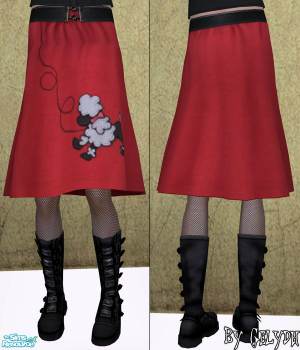
Now look at these two Maxis items. Anything look familiar?

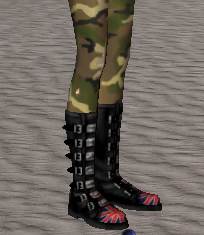
So what Gelydh's done is simply rip Maxis meshes, tweak them a little, then paste Maxis's textures onto that modified Maxis mesh. Nothing wrong with that, though, isn't that why Maxis gave us BodyShop? Of course. But then Gelydh then has the nerve to assert copyright over and charge money for something that is not even her intellectual property! So how dare she or anyone at TSR attack those of us who fileshare pay content?
Let's have a look at Aikea Guinea's work next. Here is one of her jeans.
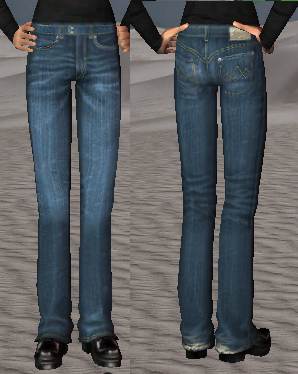
Very nice. Now let's look at a pair of Maxis jeans. These came with Nightlife for adult males.
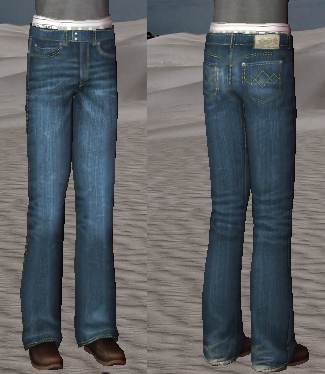
Wow! What a surprise! The jeans' textures are exactly the same! Yet if you ask Thoma$$ who owns the copyright, I wonder what answer he'll give..?
I'm sure you can find plenty more examples of pay artists stealing Maxis work, pasting on a big copyright sign and then charging you money for it. Now just ask yourself, who are the real thieves?
The tutorial on MTS2 is so flipping long-winded, so here is the quick version! Right, this tutorial will show you how to correct files made with the unpatched Pets BodyShop. These are incompatible with non-Pets versions of the game and will show up in CAS usually as a nude body, but sometimes clothing will even show up as hair! In any case these will not work with your game unless you install Pets, so you need to correct it manually.
Okay, first, open up the culprit file in SimPe.
Now, in the left-hand column in SimPe, click on Property Set, then click on whatever comes up in the Resource List window. Then in Plugin View, click on 'Parts'. (If you can see a property here called 'outfit' then the file is already compatible, so leave it alone!). With the 'Parts' resource selected, click on the 'add' link. Have a look at the screenshot below if you need to.
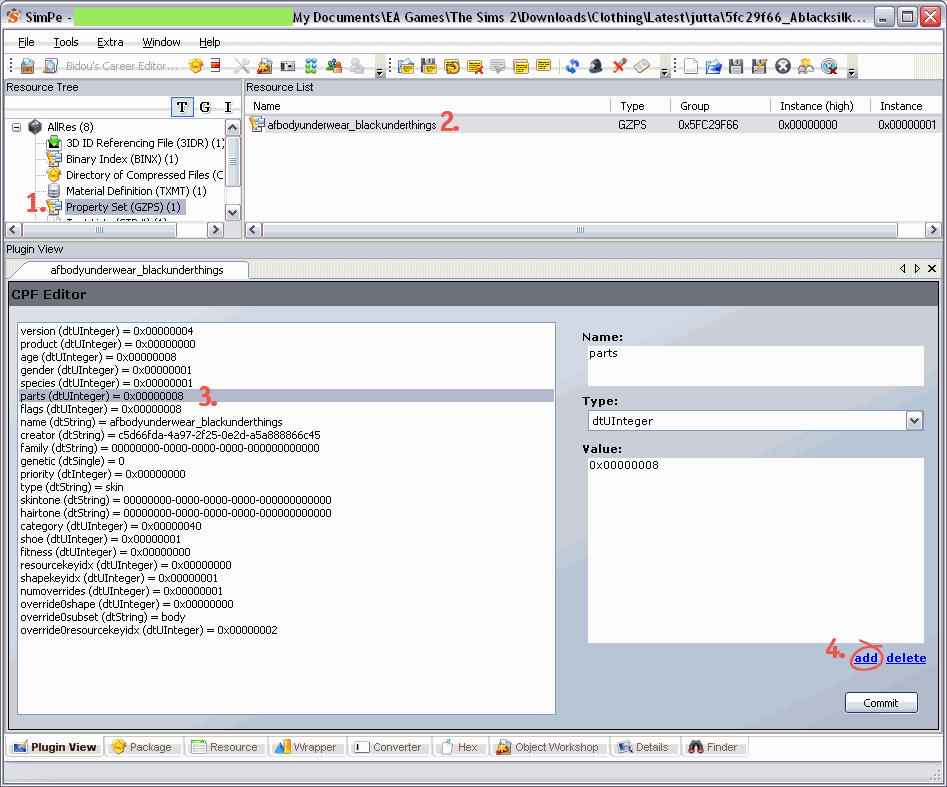
After you've pressed 'add', another line called 'parts' will be added at the end of the list. Make sure this line is highlighted. Then on the right hand side, change the text that says 'parts' to 'outfit. Click the Commit button, then save the file.
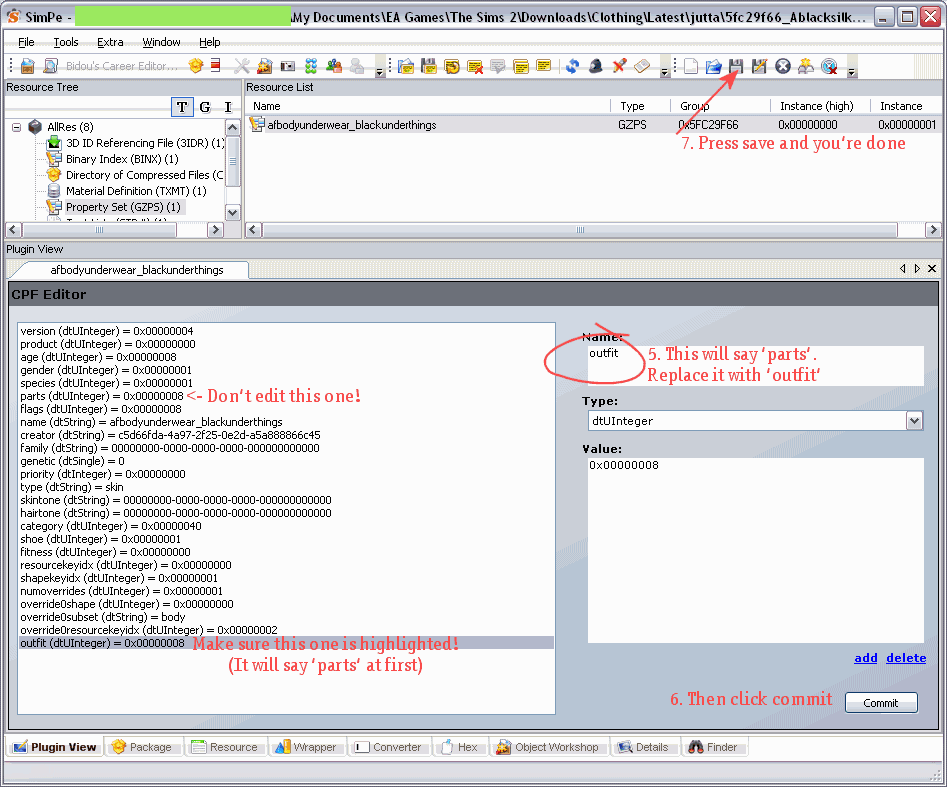
Just to be on the safe side, delete the following cache files from My Documents\EA Games\The Sims 2
And that's it! The file will now work with your game!
Try the Wardrobe Wrangler by DJSsims.com. Read the PDF manual for instructions. Mind you, it never seems to recognise dodgy files. The Fix button always remains greyed out for me, when I know for a fact that the file needs fixing, but maybe I'm just doing it wrong. Let me know if you have more luck with this.
It's not such an easy job, but here are some hints. Every time you download something new, place it in a 'Latest' folder (you can see I've done this in the screenshots above). So if you notice a nudie next time you load CAS (Create-a-Sim) in the game, or if you load up BodyShop and notice it's not there, you'll know it's a recently downloaded file and so it'll be easier to locate. Look at the tooltip in CAS and note it down, then exit the game and scan the relevant folder with the Clean Installer and look for whatever was in the tooltip, have a look at the texture, if it matches up, hover over the file name and you've found your man. I also have the habit of renaming files to make them easier to recognise (e.g. creatorname-pinktopAF.package is more recognisable than 8f5369d_prettytop.package).
If you don't mind using boolprops, you can use the cheat boolprop testingcheatsenabled true to show the filename in CAS (I think. I don't actually use this myself)
... and other super happy fun stuff.
Please read all the info on this page before complaining that 'it doesn't wooooork!!!'
This is only DOWNLOAD troubleshooting! If you are having other issues with your game that are not related to custom content, please visit The Sims 2 Wiki
bitTorrent is a method of P2P filesharing. You will need a bitTorrent client like qbit torrent to download. Once you've installed that, just follow the link to the torrent you want, click 'Download this torrent'. When prompted, open it with qbit torrent and away you go.
A seeder is someone who has a complete copy of all the files in the torrent. Without seeders you will not be able to download all the files. I'm trying to seed for as long as possible, but I can't keep all these files on my hard drive forever. I clear out a few torrents now and then, and unfortunately if no one else is seeding there's nothing I can do. You'll just have to wait till a seed connects, or get what you want from the booty. Therefore, once you have a complete copy of a torrent, please leave it to seed until your ratio at least goes up to 3 (unless its a large torrent, in case 1.5 will do ;)). Even if you only want part of the torrent, please just let whatever you have seed for a while.
Please see this page for more on bitTorrents
If you only want a small number of files, then taking the file from the booty would be more convenient, as in most torrents I've grouped things together in a few large zips. So if you want most of the items by a particular artist, then getting the torrent would be faster and easier, plus you will help to ease the load from the booty servers.
PS. I don't run the booty... just in case you didn't get it the first time.
All files should be unzipped into My Documents > EA Games > The Sims 2 > Downloads (with a capital D). Create the folder if you don't have it. The files need to be unzipped! Just placing the zip files in the folder will not work! I recommend Extract Now for batch unzipping.
You can organise your downloads into subfolders if you have Nightlife or above. If you don't (i.e. only the base game or Uni), move everything out of the subfolders and into the Downloads folder direct.
.package files should be placed directly into the Downloads folder, they will automatically be installed. Don't double click them or anything, just place them straight in. Sims2Pack files need to be double clicked to install. Once installed you can delete the Sims2Pack file. Sometimes you might need the Clean Installer, especially to install sims.
Please make sure you have custom content enabled. Check your game settings if you're unsure. Installing expansion packs sometimes disables custom content, so double check.
Object recolours may require the CEP.
Some files may be EP-specific, please refer to the creator's site for details.
If clothing, hair, etc is showing up in CAS (usually as a naked sim body) but not working in-game or showing up in BodyShop, it was probably made with the version of BodyShop that shipped with Pets, and won't work unless you have the Pets EP installed. Either ask the creator to recreate the file with the patched Pets BodyShop or you can fix the file yourself with SimPe. Here's how to do it.
If custom content is showing up as Maxis defaults, (or for objects, not showing up at all) this means the item requires a custom 3rd party mesh which you do not have installed. Refer to the creator's site for details on which mesh is needed and where to get it. Unfortunately I cannot bundle every single mesh required for the items in the torrents.
If previews are corrupted, clean out your game's cache files. From your My Documents > EA Games > The Sims 2 folder, delete the following:
cigen.package
groups.cache
everything in the Thumbnails directory
The game will recreate these files next time you run it, and previews should be fixed. It's a good idea to clear these out now and then anyway, especially if you use BodyShop.
Is your game crashing during the loading screen after installing any of these downloads? To avoid this, I recommend creating a subfolder (if you have Nightlife or above, that is), in Downloads and calling it 'Latest', or something like that. Whenever you install something new, put it into there. Run the game, if it works fine, you can move the contents of the folder out into the main Downloads folder (or appropriate subfolder). Use this procedure every time you install something new, so if something does screw up your game (common with anything from TSR), it's so much easier to find and delete the culprit (it will most likely be a mesh file, use the binary search method to identify the baddie if you have a lot of files to get through). For this reason I also recommend installing a small number of things at a time, especially meshes.
I recommend keeping the size of your Downloads folder below 2GB, as having too many files can cause problems with your game (not to mention your game will take an age to load). Give your game a good spring cleaning now and then by deleting all custom content that you don't use. You'll find your game runs a lot smoother and is more stable when it has less CC to deal with. You can reduce the size of your Downloads folder by using the Sims 2 Compressorizer.
If you're still stuck, read Downloading for Frackin' Idiots
< < Back to the torrent list [old site]
Once you are happy with your final story, you can save it as a dynamic HTML file. Select the button below:
Choose a convenient location for your story files. It's best to create a separate folder for each story. Give your file a name and save with the following option:

It will ask you do you want to copy the images as well. Hit yes.
Now we're going to edit the code. The layout of the page is currently like this, which I don't think is very pretty.

If you're happy with the layout as it is, that's fine. But I'm guessing you're not, which is why you're reading this tutorial. Open up your HTML file, and let's start tampering with the
code!
I could just walk you through all the individual changes, but that would take too long. So let's just copy and paste - much quicker! The first thing we are going to change:

Delete EVERYTHING from the top of the page up to line 156 as shown above. Now replace it with the text in change1.txt from the goodies zip (you did download it didn't you?!). On line 6, between the title tags, add your story title. This is what will show up in the title bar of the window.
What has this change done? It's replaced the legacy HTML with the more modern and correct XHTML, added a stylesheet link (more of this later), stopped the file using your story text as the image's alt text and stopped search engines from creating cache copies of your files.
NOTE: If your screenshots are NOT 600x450, you will need to edit the numbers on line 110 to whatever dimension your images are. Next up, we will change the actual layout of your page.
You need to delete everything from the <body> tag and below. That's this:

You can't see the text too well here. In any case, search for the opening body tag (it will be about 26 lines from the bottom) then delete this line and everything below it. So the last thing in your document should be
</script></head>
If you want the title and navigation buttons to be above the picture, as I have done for my stories, paste at the end of the file the text from change2-top.txt. If you'd prefer the title and navigation buttons to be below the image, paste in the text from change2-bottom.txt. Two lines you need to change. YOUR TITLE HERE with your story title, and YOUR NAME HERE with your name. You might also want to paste in EA's disclaimer if it won't be elsewhere on the page. Please don't remove the credit to me from the page! Since you're copying and pasting my code it's only fair I get a name-check, no?
One more change we need to do is a find and replace. If you're using HTML-KIT, hit Ctrl-H and enter <BR> into the find field, and <br /> into the replace field and hit Replace All. If you're using a different text editor you'll have to work it out yourself, usually Edit > Replace, or something like that.
Save your file and have a look at the results. The layout is now okay, but could be prettier. That's where our style sheet comes in!
This is called story.css. If you're going to edit the name of this file, be sure to also change the text on line 9 of your HTML file or it will not work. Copy this file into the same folder as your HTML file. Let's open up the stylesheet now. Don't just double-click the file unless your PC is configured to handle CSS files. You need to tell it to do this, otherwise open the file with your text editor.
The colour scheme here is the one I've used on my stories. Have a look through to see if you like it. You might want to change the colours to fit in with your own site scheme. Here are the bits you'd most likely want to change. It's the bit after the colon [ : ] that you need to modify. For a list of colours visit W3Schools.
That's it! Your story file is now ready!
There are a few things you need to know before uploading. Firstly if you are using blog software like wordpress, livejournal, blogger, etc, most likely you will not be able to post your dynamic story there. Why? Because they tend to disallow JavaScript. You will need to host your files elsewhere, like tripod.com or one of those. If you have your own web server, then you can upload as is.
Hosting your pics - you will need to edit the code to link to your photos correctly. This is pretty simple; a bit of Find and Replace will sort it out for you. Find snapshot_ (don't forget the underscore or you will screw up the code!) and replace with [your url]snapshot_ e.g. in my case replace snapshot_ with
http://i228.photobucket.com/albums/ee162/silverssimstuff/JasmineOne/snapshot_
And you can also see I've created a separate folder for each story's photos. It makes it easier if you want to delete and change pics. Remember that, especially if you use a lot of photos, stories can take up a lot of space, up to 5MB or more for a typical 60 page story! Lastly, don't forget the stylesheet! You can use the same stylesheet file for all your stories, you don't need a separate copy for each one, just make sure the HTML file correctly points to the stylesheet file.
That's all! You're ready to upload your HTML file, stylesheet and photos (you don't need to upload the thumbnails, they aren't used by the HTML file).
Nouk will tell you:
EA is censoring info like this, it will not be found on their main Sims2 Page! But why, you may ask?
Well, because they installed SecuROM (anti piracy software) without the user's consent, and it is causing huge problems they don't wish to own up to. Instead, they deny the existence of these problems, calling them unfounded basically calling their own clients liars.
EA has been actively deleting threads at the official forum of people trying to inform other users about what SecuROM is, what it does, and that it has been illegallly installed on your computer.
Visit Noukiesims2 for the rest!
The How-to-remove-it thread @ MATY
More excellent info on why T$R doesn't deserve your money, by Money Better Spent.
Link: Why Not Pay?
Et l'extract:
Leilatigress actually sat down with three members of the EA Legal team on August 27, 2007. This is available at PMBD but for those that don't want to go look over there, it is posted here too. I asked her to cover a few topics, and here are the replies:
Q. EULA changes: TSR's making a big deal over the removal of the word 'noncommerical' in the EULA for the content manager; is this a permanent change for all EPs/Bodyshop/Homecrafter?
A. It is a permanent change for Bodyshop and Homecrafter it is not going to be in any EPs. Turned right back around and said the EULA for Bon Voyage would match Seasons.
Q. Filesharing: It's been suggested that the only problem EA has with PMBD is that we have adult content (Pandora/M&M/etc), and therefore they don't want our link on the Exchange. However, there's also a rumor that EA will stop PMBD/SFV filesharing altogether - in essence saying that paysites DO own their content. What's the real story?
A. EA has nothing against filesharing since they have the exchange which promotes filesharing. They ignored the rest of that question.
Q. The various statements from tech suport/customer support/EA legal - obviously, there's conflict. Some of it's Maxoid issues, some of it's ancient ties to TSR back when they were free. So what's the story? WHO has final say?
A. Unless it’s signed by an EA Legal team member they have no say and are not held to be responsible for anything or anyone, EA Legal says.
Q. Obviously, the big thing we want is ANY clear statement - paysites good, paysites bad, filesharing good, filesharing bad, or 'we don't give a rat's ass what happens in the fan community".
A. Filesharing good, paysites bad was the statement I got and that is verbatim.
Hooray!
PS. EA is a joke
I'm not even joking. Is this T$R's idea of being funny?


They both just come across as a pair of twits!!!! XD
Check out Leah's corner to get your revenge!
It's only now that I've left TSR that I realise just how many disadvantages there are to submitting your work to that site. Now obviously with the custom content, you have no control of it once it get published: you can't edit or delete your creations at all without first clearing it with a moderator (every other community site I know of allows submitters to modify and update their creations at any time). This means that if you find a problem with something you uploaded, rather than just reuploading the file/screenshot, you have to sort it all out with a mod first, and even then you have no guarantee that you'll be allowed. And of course, they never ever allow you to remove your uploads. In other words, they are quite happy to keep your files on their servers without your permission, but if you share their pay files without their permission, you're evil and deserve a ban. Hypocrites.
As well, the free artists upload their work because they want to share, TSR wants the free artists to upload so they can lure more visitors, and therefore have more potential subscribers. In other words, TSR are exploiting you for profit, nothing more.

Hosting my files elsewhere means I now get total control of my custom content, but I think the biggest advantage of having an independent site is that I also get complete control over my stories. One thing that peed me off a lot about TSR's story-hosting was just how hard it is for an author to continue to perfect their work after it was published. When I edited and reuploaded part 1 of Jasmine's story, after waiting over a week for the story to be approved (they never took more than 2 days ordinarily) I thought something must have gone wrong, so I reuploaded again, only for all my feedback to get deleted and to have to then re-upload once more for it to work. So you have to go through all that hassle just to make a few minor changes to a story. It makes me wonder how I ever stood for it! Now that I'm in complete control of my stories, I am free to modify screenshots when I want, I can add and delete scenes any time and make those all-important typo corrections and minor tweaks...whenever I like. Something you will never get with TSR.
(Fanseelamb put it much better than I did.)
They really don't know how to make good cartoons nowadays. So here are my top 3 kids' shows from bygone times...
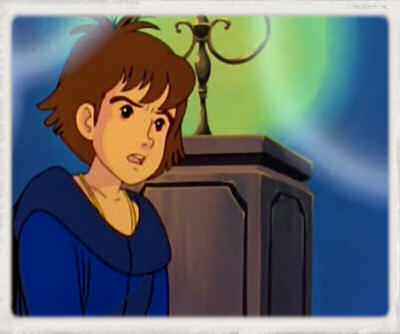
This is undoubtedly the best cartoon ever made, and if you disagree with me, it means you never watched it 😉
MCoG is set in 1532 and follows Esteban, a twelve year old orphan boy from the Americas. Continue reading
Q. Can I use your custom content on sims/lots I upload to another site?
Sure, on 100% free sites (yes, even the Exchange) and you properly credit me and include a link back to here. Also please leave a message on my guestbook/CC pages to let me know!
I do not want my work on sites that charge for content in any way, whether directly charging or through a subscription. Voluntary donation sites (like WNF, InSim, etc) are fine, "donation set" sites are not! And under no circumstances may you put anything of mine on The Sims Resource; I don't care if it's in the free section. No TSR and this is not negotiable.
Continue reading